
If your Google rankings held while your clicks fell, AI Overviews are the most likely cause, and Search Console can show whether the pattern fits: on queries where your position did not move, clicks drop where an AI Overview now appears and hold where it does not. The fix is not to win back every lost click. Get cited inside the Overviews on the questions your buyers ask, move effort to the pages that sell, and judge the work by citations and leads instead of sessions.
This guide covers the test step by step, what the published studies actually measure, a real example from a client’s Search Console, and how to decide what to change on each page. How to earn the citation itself is covered in our guide to optimizing for Google AI Overviews and AI Mode.
How many clicks do AI Overviews take?
On queries where an Overview appears, most studies put the loss at about 40% to 60% of the clicks a result would otherwise get. The strongest evidence is a randomized experiment. Agarwal and Sen randomly assigned 1,065 US desktop users to groups in January and February 2026; for one group a Chrome extension hid AI Overviews. Where an Overview would have shown, removing it raised outbound organic clicks from 0.37 to 0.62 per search, so the Overviews cut those clicks by 39.8%. People who still clicked were no more engaged with the sites they reached. The paper is a working paper and has not been peer-reviewed.
The other numbers you see quoted measure different things:
| Study | What it counts | With an AI Overview | Without one |
|---|---|---|---|
| Agarwal and Sen, randomized test, Jan–Feb 2026 | Organic clicks per search | 0.37 | 0.62 |
| Pew Research Center, 900 US adults’ own searches, March 2025 | Visits to a results page that ended in a click on a regular result | 8% | 15% |
| Seer Interactive, 53 brands, Jan 2025–Feb 2026 | Organic clicks per million informational impressions | about 20,743 if cited, about 9,445 if not | about 33,500 |
| Ahrefs, 300,000 keywords, Dec 2023 vs Dec 2025 | Desktop click-through rate of the #1 result | 58% lower | baseline |
| Advanced Web Ranking, US desktop, July 2026 | Click-through rate of the #1 result | 9.69% | 20.02% |
Clicks per search, per visit, per impression and for the top result only are different units, so averaging these figures produces a number nobody measured. Use them for direction and rough size, then measure your own site.
Google disputes the scale. Its Head of Search, Liz Reid, wrote in August 2025 that “total organic click volume from Google Search to websites has been relatively stable year-over-year”. The same post concedes the part that matters to a single business: user trends are “shifting traffic to different sites, resulting in decreased traffic to some sites and increased traffic to others.” Stable totals across the web say nothing about your site. Your Search Console data does.
How do you tell whether AI Overviews caused your traffic drop?
Run a controlled comparison in Search Console: the same queries, two periods, position held steady, split by whether an AI Overview now appears. If clicks fell much more on the Overview group than on the rest, the Overviews are the likely cause. You need an export, a spreadsheet and one results-page check per query.
Step 1: Check Search Console’s own data breaks
Before you compare anything, read Google’s data anomalies page. Two events break year-over-year comparisons made in 2026:
- A logging error from 13 May 2025 to 27 April 2026. Google says it “prevented Search Console from accurately reporting impressions” in that period and that “only impressions and related metrics - CTR and average position - were affected; clicks were not affected”. Impressions, click-through rate and position from inside that period do not compare with later data, so a year-over-year drop in impressions can be the fix, not your traffic. Clicks compare. Rates compare only between two groups of queries measured over the same dates, and only if the error hit both groups alike, which Google does not say.
- Mid-September 2025. When Google stopped supporting the setting that let rank-tracking tools load 100 results per page, many sites saw desktop impressions fall and average position jump overnight. Both client sites we analyzed show the break in the week of 8 September 2025. Start any “before” window after it.
Step 2: Rule out the other causes
An AI Overview takes clicks. It does not reduce how often people search, and it does not push your page down the rankings, although a new Overview above your result can add about one place to its reported position. If the problem looks like one of these, start there:
- Lost rankings. In the Performance report, compare the two periods and look at position by query. Lower positions mean a ranking problem.
- Less demand or seasonality. Fewer searches show up as falling impressions; read them after the data breaks above. Compare the same weeks a year apart, not last month with this month.
- Indexing or technical problems. The Page indexing report shows pages that dropped out of Google’s index; URL Inspection checks a single page.
- A Google update. Match the date the drop started against the Google Search Status Dashboard.
- Other parts of the results page. More ads, shopping units, video carousels or a lost featured snippet also cut clicks. Seer found click-through rates on commercial queries falling even where no Overview appeared and wrote that “AIO is not the only force compressing organic CTR.”
- Tracking. If analytics shows a drop and Search Console clicks do not, check the analytics setup before you check Google.
Step 3: Export two comparable periods
Search Console keeps 16 months of data. Compare the same weeks a year apart where you can, because that cancels out seasonality. Export clicks, impressions, click-through rate and position by query, with the landing page, and remove branded queries: on eligible sites the Performance report has a branded queries filter, and brand searches behave differently because people are looking for you.
Search Console leaves out rare queries for privacy. On the two client sites we analyzed, only 26% to 38% of US clicks came with a query attached, so a query-level test describes part of your traffic, not all of it.
Step 4: Keep the queries whose position held
Keep queries with enough impressions in both periods to mean something; we used 200 or more in each. Then keep those that ranked in the top 20, whose average position moved by one place or less and whose impressions did not change more than threefold either way. Position is an average over the days a query showed, so a query with a handful of impressions can swing several places on noise alone. If your earlier window falls before 27 April 2026, its positions are distorted too, so treat “held” as approximate.
Step 5: Check which queries now show an AI Overview
Search Console does not say which queries carry an Overview. Take the queries that lost the most clicks and an equal number that held, 30 to 50 in all, and search each one in a private window set to your market, or use the results-page data from a rank tracker or a SERP API. Record two things: whether an Overview appears, and whether it cites your page. A single check is a snapshot, because Overviews come and go for the same query.
Step 6: Compare the Overview group with the rest
Calculate the change in clicks and click-through rate for each group, weighting the rates by impressions. If the Overview group lost far more than the queries without one, the Overviews are the likely cause; check that nothing else changed on those pages, such as titles, URLs or content, before you settle on it. If both groups fell by the same amount, something else is at work. Compare the change, not the level: Seer found that queries showing an Overview in September 2025 had lower click-through rates than the rest in every month back to June 2024. If your windows straddle 27 April 2026, trust clicks first.
Why your average position can rise while clicks fall
Search Console gives every link inside an AI Overview one shared position, the Overview’s, and reports the topmost position your page held for each query. If your page ranks seventh and an Overview at the top of the page cites it, that impression is logged at the Overview’s position. A link inside the summary can also earn an impression on a query where your regular result would sit too low to count.
The result is a pattern many site owners misread as good news: average position climbs, impressions grow and click-through rate falls. Seer saw the impressions-and-clicks half of it: from September to October 2025, impressions on searches where its client brands were cited in an Overview more than doubled, from 15.8 million to 33.1 million, while clicks stayed at about 400,000. Seer reads that as more citations rather than fewer clicks, and those months fall inside Google’s impression logging error, so take the size with care. Read position, impressions and clicks together before you call a page a winner or a loser.
To see which pages Google cites, open the Generative AI performance report in Search Console (Performance, then Generative AI features). It lists the pages shown in AI Overviews and AI Mode, with their combined impressions only. A page that appears there and whose queries show the pattern above is being cited; the open question is whether the citation brings anything else.
What did the test show on a real site?
We ran this test on two client sites in October 2026, comparing 15 September to 30 November 2025 with 15 July to 29 September 2026, US searches only. The windows are 77 days long because 28-day windows left too few queries, and they set autumn against summer, so seasonality is not removed. The answer was useful and untidy, which is what to expect from real data.
An online store with a large library of how-to guides. We kept non-branded queries with at least 200 impressions in each window whose position moved by one place or less. From those, 37 guide queries showed an AI Overview when we checked them on desktop on 3 October 2026, and 37 product and category queries had shown none in 2026 results-page snapshots.
On the 37 guide queries, clicks fell from 487 to 314 (−36%) while the reported average position went from 6.4 to 6.5. On the 37 product and category queries, clicks rose from 160 to 169 at a reported position of 7.6 in both windows; 11 of them did show an Overview in our live check.
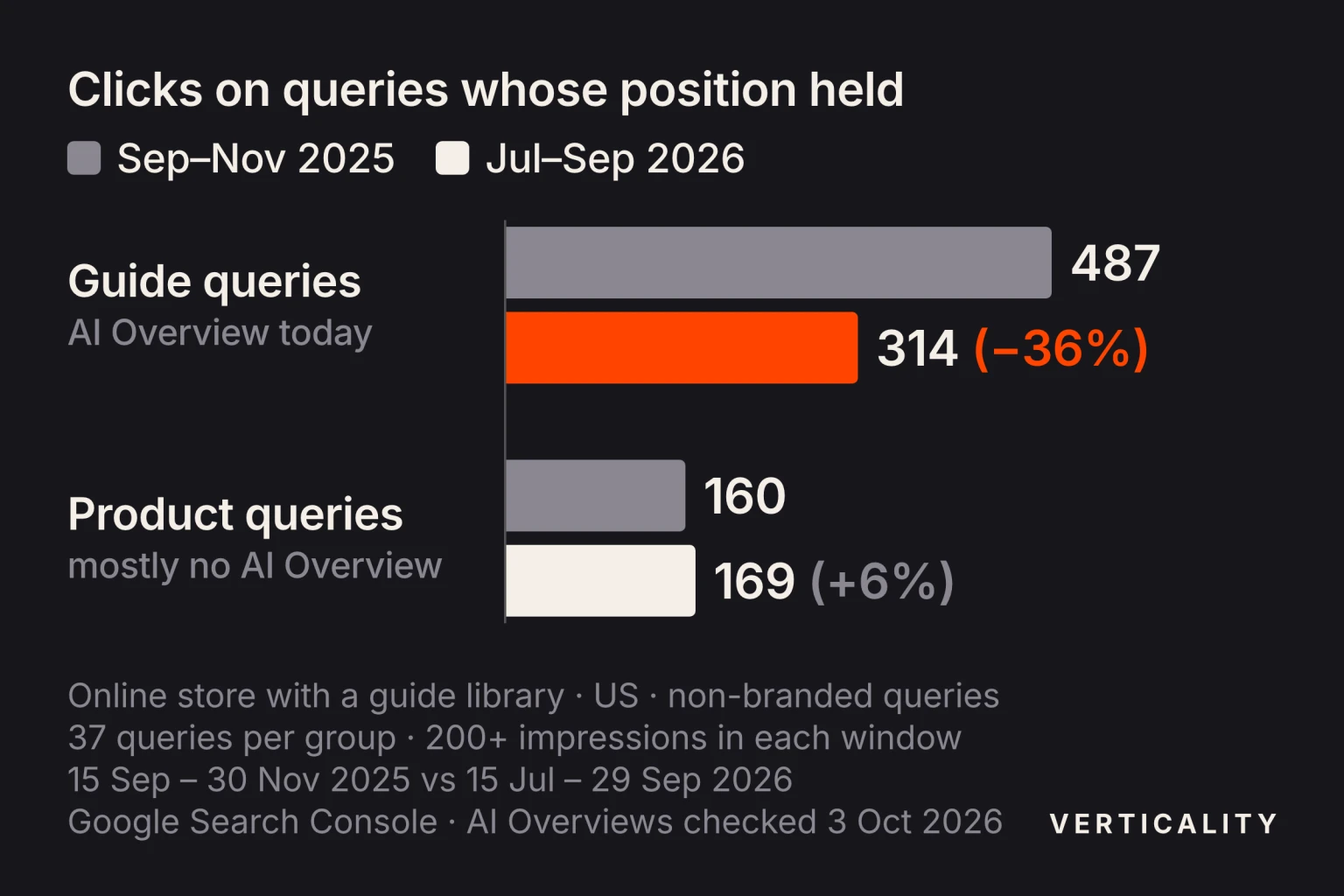
Same store, same windows, same positions: the guide queries lost a third of their clicks, the product queries lost none.
That is the pattern an AI Overview produces, but it does not prove the Overview caused all of it. On 26 of the 37 guide queries an Overview already showed in October and November 2025, the guide pages changed during the year, and the five guide queries that showed no Overview in 2026 snapshots lost clicks too (28 to 20). The “before” window also falls inside Google’s impression logging error, which is why we compare clicks and treat the positions as approximate.
The store’s data is also consistent with the position trap. In one desktop check, seven guide queries had an Overview citing the store’s page while the store had no regular result in the top 10. For five of them, Search Console reported an average position between 2.4 and 4.0 over the summer.
A B2B software company. Its main how-to query showed an Overview in both years and got 120 clicks before and 121 after, at a similar position. An Overview on the results page is not a verdict on its own; the comparison across many queries is what tells you.
Which pages lose the most clicks, and which hold?
Pages that answer a question in a sentence lose the most. Pages that help someone buy or contact you lose the least. Google’s own example of a search where people “may be satisfied with the initial response and not click further” is “when is the next full moon”.
Where Overviews appear:
- Informational queries far more than buying queries. In the tracked queries of 53 brands, Seer found Overviews on 36% of informational queries, 8% of commercial and 5% of transactional ones.
- Questions and long searches. Seer saw Overviews on 85.9% of question-style informational queries. Pew found summaries on 53% of real searches of ten words or more and on 8% of one- or two-word searches.
- Comparisons too. “X vs Y” research queries are not safe: among Seer’s informational queries, comparisons got an Overview 95.4% of the time, though that set was only 280 queries.
- Non-branded more than branded. Ahrefs found Overviews on 24.9% of non-branded and 13.1% of branded queries.
How clicks respond: Advanced Web Ranking found transactional queries “flat to positive” for most of the AI Overview era, and navigational queries rarely showing an Overview, but losing the most when one does appear. In the randomized test, the measurable loss was on informational queries.
In the two-client test above, among queries whose position held, product and category queries kept their clicks (272 to 266 across 77 queries), while topic queries answered by a guide lost 41% (511 to 302 across 64) and how-to questions lost 21% (248 to 195 across 15). “What is” queries ranked around ninth with almost no clicks in either year, so they told us nothing.
What should you change first?
Sort the pages that lost clicks by what they earn, not by how much traffic they lost. Pull leads, sign-ups, sales and assisted conversions by landing page from your analytics for the last year, then put each page into one of three groups:
- Defend: pages that sell. Pricing, product, service and case-study pages rarely lose much to Overviews, and every lost visit costs money. Comparisons in which you are one of the options belong here too, but they draw Overviews often, so check them first. Where an Overview shows on these queries, make sure it cites you rather than a competitor.
- Rebuild for the citation: questions buyers ask on the way to buying. Guides on problems your product solves, “how to choose” pages, cost questions. They lose clicks, but being the cited source keeps your name in front of the buyer.
- Let go: answers that never converted. Definitions and quick facts that brought traffic and no business. Keep them accurate, link them to the pages that sell, and stop counting their sessions as a goal. Andy Crestodina of Orbit Media described one of his own tips articles: “of the 82,000 organic visitors who landed on it over the last three years, there have been zero conversions.”
Get cited inside the Overview on the questions you keep
A citation is worth having. In Seer’s 2026 data on informational queries, impressions where a brand was cited earned 120% more organic clicks than impressions where it was not. Seer calls this a correlation, since stronger brands get cited more often. Ranking well helps but does not guarantee it: in Conductor’s study of about 168 million citations from June to August 2026, a page in position one was cited nearly 25% of the time, and 57% of citations went to pages outside the organic top 10.
For each question you keep, look at what the Overview cites today and what those pages offer that yours does not. Put a direct answer in the first sentence under a heading that matches the question, then add a fact only you can state: a price, a test result, a client outcome, a number from your own data. The full method is in our guide to optimizing for AI Overviews and AI Mode.
The cited source is not always a web page. For the question this guide answers, Google’s Overview cited LinkedIn and YouTube in 22 of 29 answers each over 30 days, according to our tracker. If the Overviews in your topic cite posts and videos, publish the answer there as well.
Give the remaining click a reason
The summary answers the question; it cannot run your calculator, hand over your file, show your screenshots or quote your price. Put something on the page that a reader has to visit to get, and say so near the top: a working tool, a worked example with real numbers, a file to download, original data. A list of sample texts is a weak reason, because the summary can write samples of its own. A page that only restates what the Overview already says has given the searcher no reason to scroll down to it.
Move effort to pages close to a sale
Commercial and transactional searches rarely get an Overview, and transactional clicks have held up best, so the hours you spent defending informational traffic return more here. Build out pricing, product and service pages, “for [industry]” pages, integrations, alternatives and case studies. Link to them from the informational pages that lost clicks, so the visitors you still get have a next step.
Grow the searches for your name
Overviews show on branded queries about half as often as on non-branded ones, according to Ahrefs, and a branded result at position one earns more clicks to begin with: 27.3% against 19.4% for unbranded terms in Advanced Web Ranking’s July 2026 data. Being named in the sources AI answers draw on, such as industry roundups, review sites and forum threads, can create searches for your name. Search Console counts them under branded queries, so watch that line rise as the generic one falls.
What not to do
- Do not switch off AI features to force clicks. Setting Search generative AI to Exclude in Search Console takes your pages out of AI Overviews and AI Mode;
nosnippetdoes the same and also removes your regular snippet. The Overview will usually still show for that query, citing someone else, with your result below it. - Do not publish a page for every phrasing of a question. Google treats pages made mainly to catch variants of a query as scaled content abuse; one page with a heading per sub-question does the job.
- Do not judge the work by sessions alone. Organic sessions will keep falling on informational pages even when the work succeeds.
How do you track AI Overview citations and the traffic they send?
No single report shows clicks from AI Overviews. Google counts a click on a link inside an Overview as an ordinary click in the Performance report, and your analytics records it as Google organic. Track three things instead, monthly:
- Which pages Google shows in AI features. The Generative AI performance report in Search Console lists pages with their combined AI Overview and AI Mode impressions by date, country and device. It has no clicks and no queries.
- Whether you are cited on the questions that matter. Keep a fixed list of buyer questions and check on a schedule whether an Overview appears, whether it cites you and which page. Our tracker does this daily for Google AI Overviews, ChatGPT and Perplexity; the method is in how to measure AI visibility.
- What the traffic you keep is worth. Leads and sales by organic landing page, and branded query impressions in Search Console.
Rerun the Search Console test from this guide every quarter. If the Overview group’s click-through rate stops falling while citations and branded impressions grow, the change is working.
Want to know where you stand?
Our generative engine optimization program starts with a free AI visibility audit. We run 50 to 200 of your buyers’ questions through Google AI Overviews, ChatGPT and Perplexity and show which ones cite you, which cite competitors, and which pages to fix first. For a quick first read, the free AI visibility checker runs 40+ buyer questions through ChatGPT and Google AI Overviews and emails your result within 24 hours.