How to Optimize for Google AI Overviews and AI Mode
Google says AI Overviews and AI Mode need no special markup. What its 2026 guide asks for, what we observe in AI answers, and where Search Console shows it.

COO · AI Search & Data Architecture
You optimize for Google AI Overviews and AI Mode the same way you optimize for Google Search. Google asks for a page that is indexed and can show a snippet, on a site that has not been switched off in Search Console’s generative AI setting, which is on by default. There is no special markup or AI file to add. What earns the citation is a page that answers the sub-questions Google searches for behind the main question, with facts the other ranking pages do not have.
This guide keeps two things apart. Google’s position is quoted word for word from Search Central and was checked on 3 October 2026. What we observe comes from our own AI visibility tracker and our own Search Console, and is marked as an observation.
What does Google officially say about optimizing for AI Overviews and AI Mode?
Google says there is nothing extra to do. Its page AI features and your website (last updated 10 December 2025) states: “There are no additional requirements to appear in AI Overviews or AI Mode, nor other special optimizations necessary.”
On 15 May 2026 Google published a longer guide, Optimizing your website for generative AI features on Google Search, last updated 10 July 2026. It names the practice directly: “From Google Search’s perspective, optimizing for generative AI search is optimizing for the search experience, and thus still SEO.” How answer engine optimization relates to classic SEO is compared in AEO vs SEO.
The eligibility rules
The 2026 guide lists two conditions a page must meet before anything else matters:
- Indexed and snippet-eligible. “To be eligible to be shown in generative AI features on Google Search, a page must be indexed and eligible to be shown in Google Search with a snippet, fulfilling the Search technical requirements.”
- Included in Search Console’s generative AI control. “In addition to the technical requirements for Search, a site must be included in Search generative AI features in Search Console to be eligible for display in generative AI features on Google Search.”
The second rule is new. The Search generative AI control sits under Settings in Search Console and reached all sites on 31 August 2026. Include is the default for every property, so most sites are already eligible. A property switched to Exclude is taken out of AI Overviews, AI Mode and Discover’s AI features, usually within one to two days, Google says.
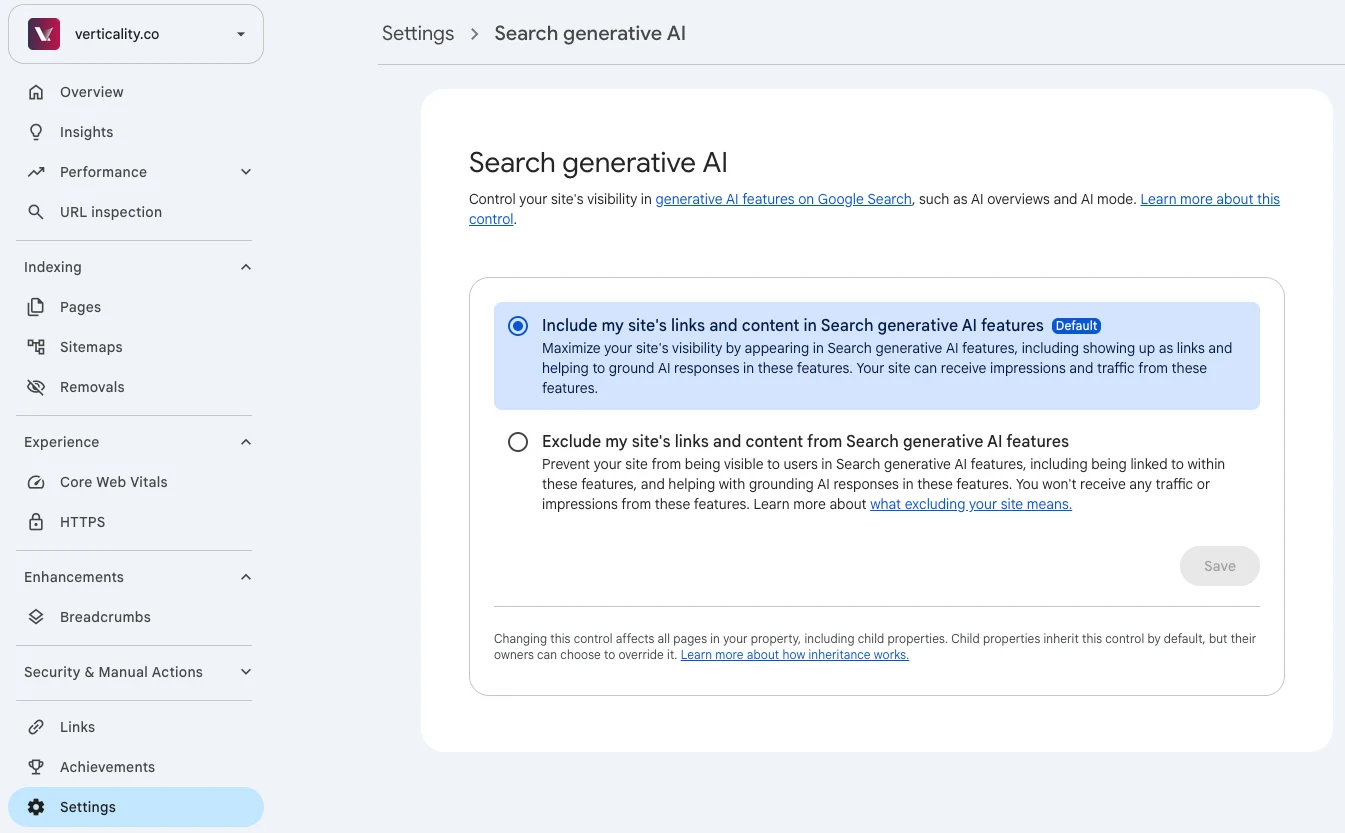
Include is the default. Exclude takes a site out of AI Overviews and AI Mode, usually within one to two days.
What Google says you can ignore
The same guide has a section called “Mythbusting generative AI search”. For Google Search, these do nothing:
- llms.txt and other AI files. Google Search does not use “new machine readable files, AI text files, markup, or Markdown”.
- Chunking. “There’s no requirement to break your content into tiny pieces for AI to better understand it.”
- Special schema. “Structured data isn’t required for generative AI search, and there’s no special schema.org markup you need to add.”
- Rewriting for AI and long-tail stuffing. Google says its systems understand synonyms, so you do not need every phrasing of a question.
- Manufactured mentions. Google calls seeking “inauthentic ‘mentions’” less helpful than it looks, because its spam systems sit under the generative features too.
- Tools that claim inside knowledge. “No third-party tool has access to our internal ranking or AI systems.”
How are AI Overviews and AI Mode different?
AI Overviews and AI Mode follow the same rules but build different answers. Google says both “may use a ‘query fan-out’ technique”, which lets them show “a wider and more diverse set of helpful links” than a classic results page, and that the two “may use different models and techniques, so the set of responses and links they show will vary.”
| AI Overviews | AI Mode | |
|---|---|---|
| When it appears | Above the results, only when Google judges it “additive to classic Search” | When the searcher chooses AI Mode; Google pitches it for “exploration, reasoning, or complex comparisons” |
| How it searches | May fan out into related searches | ”It divides your question into subtopics and searches for each one simultaneously” |
| Follow-ups | A “jumping off point” to the links | Built in; each follow-up counts as a new query in Search Console |
| Position in Search Console | The whole Overview is one position; every link in it shares it | Standard position rules |
Observed (single check, 3 October 2026). We ran the search “how to optimize for google ai overviews” and our full question, “How to optimize for Google AI Overviews and AI Mode”, through Google’s live results and AI Mode. The AI Overview for the search cited 8 pages, half of which also ranked in the organic top 8. AI Mode cited 4 sources for the search and 3 for the full question, and every one of them ranked on page 1 for the search. Only two sources appeared in both the AI Overview and AI Mode: Google’s own guide and one r/SEO thread. The AI Overview for a near-identical search, “how to optimize for ai mode”, shared no source with the first. Treat AI Overviews and AI Mode as two placements to check, not one.
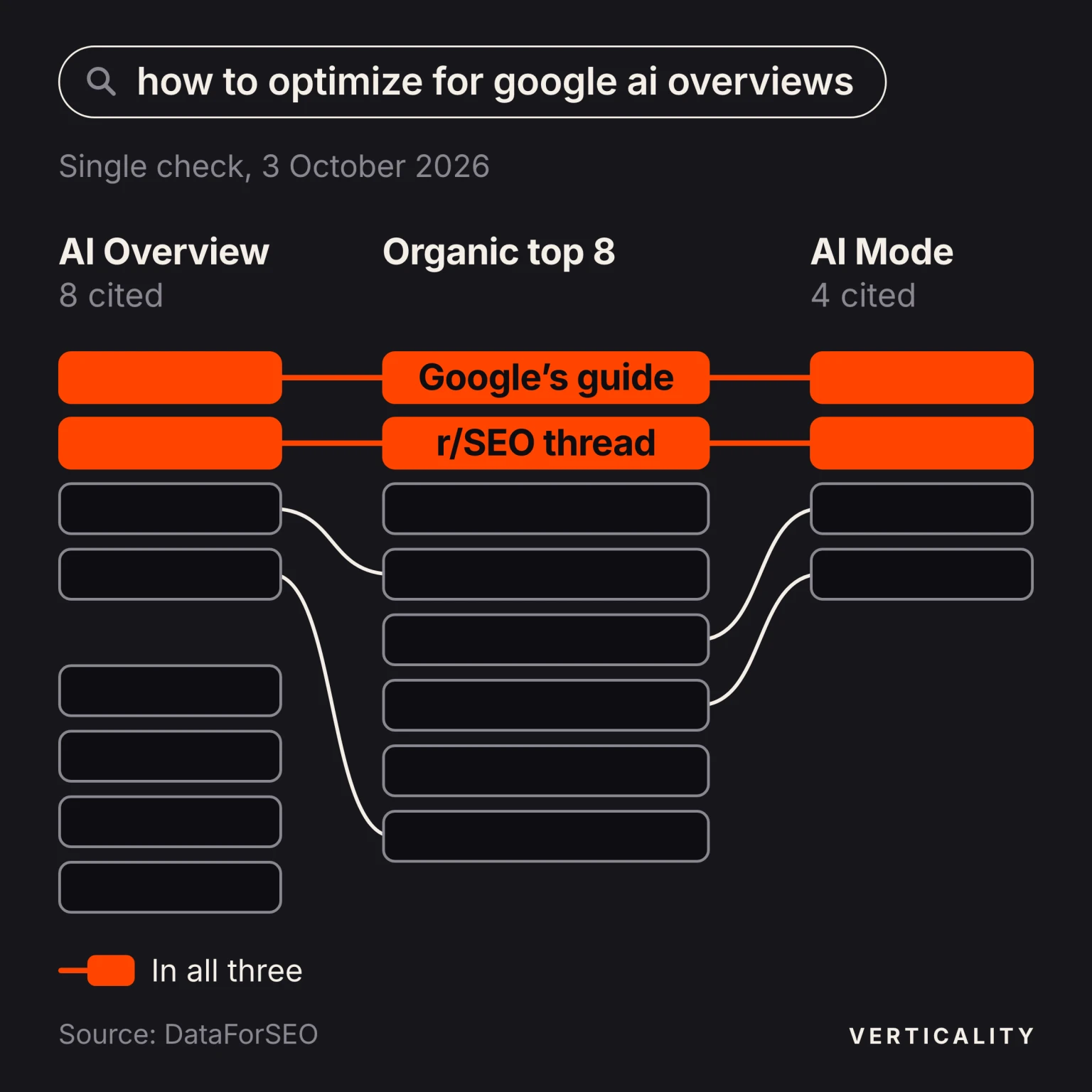
Same search, same day: AI Overview and AI Mode shared only two sources.
What do AI Overviews cite for this question today?
Observed, 4 September to 3 October 2026. Our tracker asks Google, ChatGPT and Perplexity “How to optimize for Google AI Overviews and AI Mode” once a day and stores every answer and source. Over 30 days Google returned 29 AI Overviews. Four patterns stand out:
- Google’s guide is the first source. The Overview cited Google’s AI optimization guide in 26 of 29 answers, each time in first place.
- The advice drifts from that source. In 19 of the 25 Overviews we read in full, the answer still recommended FAQPage or HowTo schema. Only 2 said that no special markup is needed.
- Forums and video carry weight. One r/SEO thread was cited in 26 of 29 Overviews. YouTube appeared in 21 of them, with 15 different videos, and LinkedIn in 13.
- The source list rotates. The Overviews cited 59 different URLs over the month. Four guides that had been cited in 11 to 18 answers each stopped appearing after dates between 19 and 28 September. On 3 October, three pages written for AI Overviews and AI Mode together were cited for the first time that month.
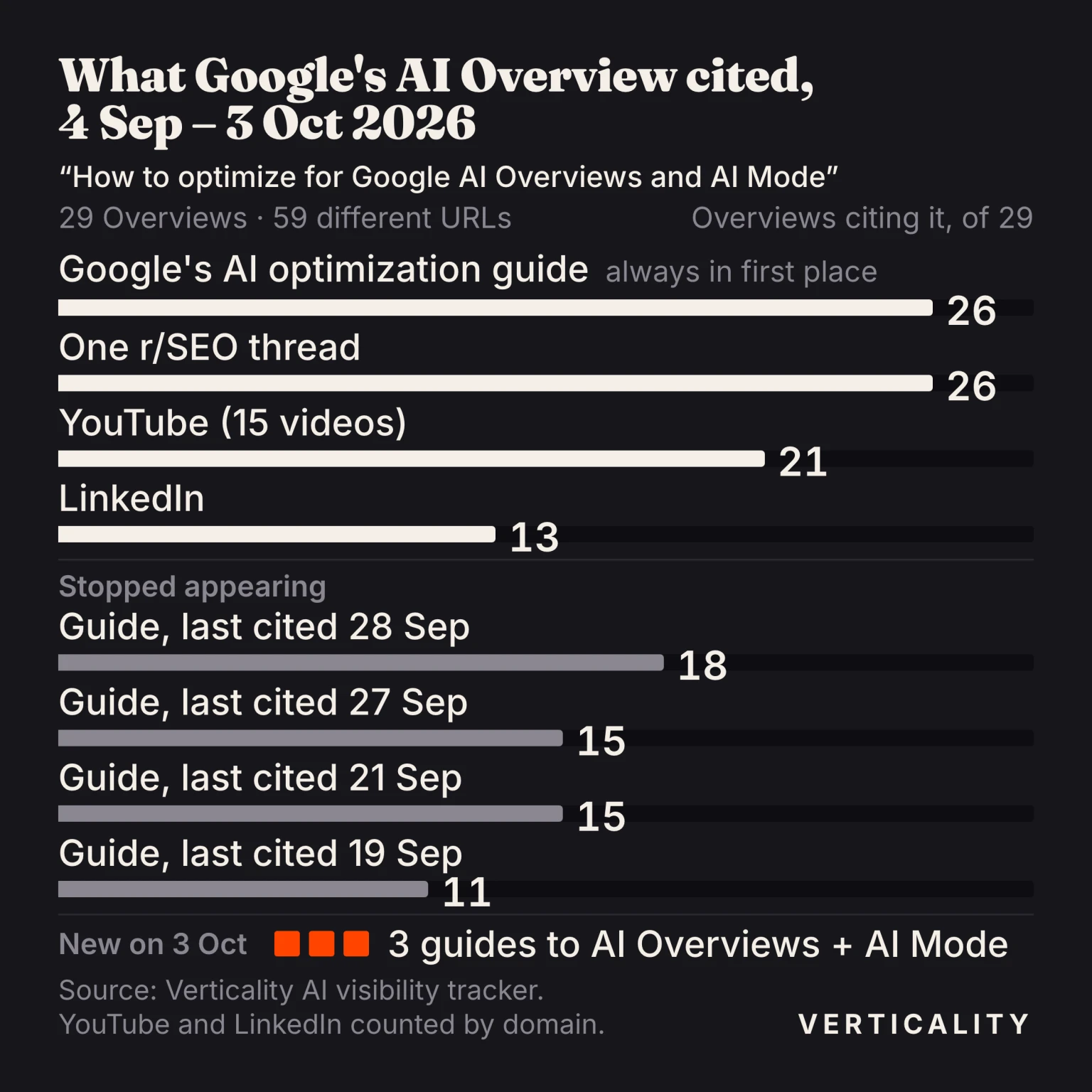
Google’s guide and one Reddit thread were cited almost daily. Four guides dropped out within the month, and three new guides to AI Overviews and AI Mode got in on 3 October.
ChatGPT, asked the same question, cited Google’s own domains and nothing else: developers.google.com appeared in all 28 of its answers. Verticality was named in none of the 86 answers across the three engines; this guide is our answer to that question.
The lesson for your own topic: before you write, look at what kind of source the Overview picks for your buyers’ questions. When it picks forum threads and videos, a page on your own site covers only part of the answer.
How do you rank in AI Overviews and AI Mode?
In AI Overviews and AI Mode, ranking means being one of the pages the answer cites. Google’s guide is the floor. The tactics below sit on top of it. Each one names the Google statement it rests on and, where we have it, what we have seen.
Cover the sub-questions Google fans out to, on one page
Google defines query fan-out as “a set of concurrent, related queries generated by the model to request more information”. Its own example: a search for “how to fix a lawn that’s full of weeds” can fan out into “best herbicides for lawns”, “remove weeds without chemicals” and “how to prevent weeds in lawn”. A page that answers only the head question competes for one of those slots. A page that answers the sub-questions competes for several.
Find the sub-questions in three places: the follow-ups AI Mode offers after its answer, the related searches under the results, and the questions your buyers ask your sales team. When we asked AI Mode “how to optimize for google ai overviews”, it offered to go deeper on three things: how people on Reddit discuss traffic shifts, which schema types to use, and how to measure AI visibility in Search Console. Schema and Search Console have their own sections in this guide.
Keep them on one page. Google warns that creating “separate content for every possible variation of how people might search (for example, by focusing on other queries that people have asked, or fan-out queries)” to steer AI answers “violates Google’s scaled content abuse spam policy.” Give each sub-question its own heading and put the answer in the first sentence below it.
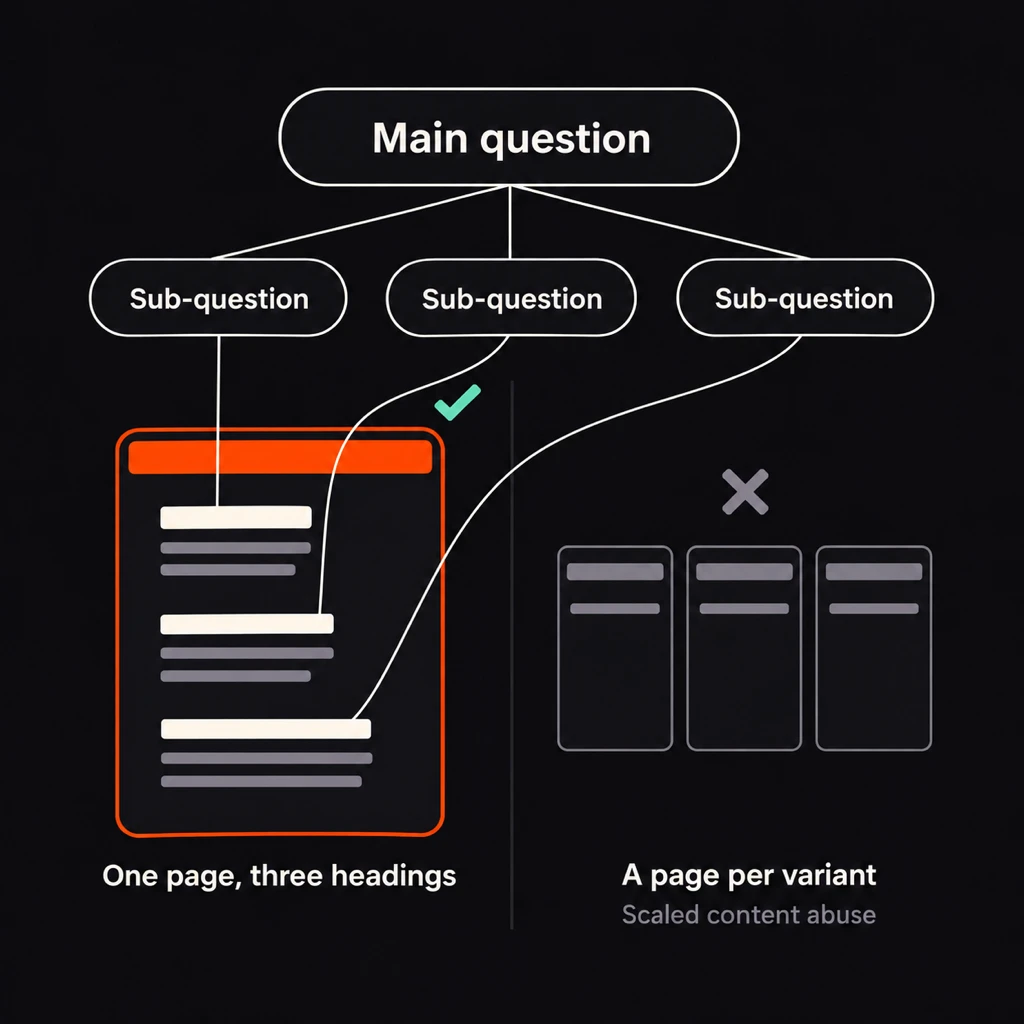
Give each sub-question a heading on one page. A page per variant breaks Google’s spam policy.
Publish facts that only you can state
Google separates commodity content from content worth showing: “Commodity content (for example, something like ‘7 Tips for First-Time Homebuyers’) is often based on common knowledge, which could originate from anyone, and typically adds little unique insight for readers.” First-hand data, your own pricing, test results, customer outcomes and screenshots of your own tools are the opposite. For how to write each paragraph so an engine can lift it whole, see how SaaS pages get cited by AI.
Keep the page current and show when it changed
Google publishes no refresh schedule for AI features. What it does say is that they use retrieval-augmented generation “to improve the quality, accuracy, and freshness of AI responses” by retrieving “relevant, up-to-date web pages”. When a number, price or rule on the page changes, change the page and show an “Updated” date. Change the date only when the content changed; a new date on old content tells the reader nothing.
Observed: for our own question, the Overview’s sources changed within one month (see the tracker data above), and pages it had never cited before entered the list. A citation won this month is not held next month by default.
Put a named author on every page
Google’s helpful-content guidance asks: “Do pages carry a byline, where one might be expected?” and adds: “We strongly encourage adding accurate authorship information, such as bylines to content where readers might expect it.” A byline that links to a real profile page tells Google, and the reader, who stands behind the advice. Every guide on this blog carries one, linked to the author’s profile on our about page.
Use structured data to name things, not to chase an AI schema
There is no AI Overview schema. Google’s AI features page asks only that you make “sure your structured data matches the visible text on the page.” Use Organization, Person, Article, Product or LocalBusiness markup to say plainly who you are, who wrote the page and what you sell. Do not add FAQ markup for a rich result: Google stopped showing FAQ rich results on 7 May 2026. Several pages that AI answers cite for this very question still recommend FAQ schema for AI Overviews; the Google AI Overview we checked repeated that advice.
Add images and video where they explain something
Google’s 2026 guide says its generative features “can bring in relevant images and video, which means more opportunities for your website to appear beyond web page links.”
Observed: for “How to optimize for Google AI Overviews and AI Mode”, the AI Overview cited a YouTube video in 21 of 29 answers over 30 days. ChatGPT cited none. If a short video explains your topic better than text, publish it and embed it on the page that covers the topic.
For products and local businesses, Google points to Merchant Center feeds and Business Profile as inputs to AI answers; keep both current.
Let Googlebot in and check your snippet controls
Google lists “ensuring that crawling is allowed in robots.txt, and by any CDN or hosting infrastructure” among the basics. A CDN rule that challenges bots can block Googlebot without anyone noticing. JavaScript is less of a risk than many guides claim: Google says it can process content in JavaScript “as long as it isn’t blocked”; the rendering limits often quoted for AI crawlers do not describe Googlebot. Snippet controls matter too: nosnippet, data-nosnippet, max-snippet and noindex limit what AI features can show from a page, so check that they sit only where you want them.
Ask readers to make you a preferred source
Since late May 2026, sites a searcher has picked as a preferred source can carry a “preferred” badge in AI Mode and AI Overviews for that searcher. Google offers a button and a deep link to ask readers for it. It matters most for publishers with a returning audience, and it requires the Search generative AI control to stay on Include.
How do you see AI Overviews and AI Mode data in Search Console?
Search Console has a dedicated report. Google calls it the Generative AI performance report; in the menu it appears as Performance, then Generative AI features, marked Beta. Google announced it on 3 June 2026 for a subset of sites and opened it to all sites on 31 August 2026.
What the report shows, per the help article and our own property:
- One metric: impressions. Google defines them as “how many times links to your site were shown to a user in a generative AI feature on Google Search.”
- Four views: pages, countries, devices and dates. Filters cover page, country and device.
- Both features together. AI Overviews and AI Mode are counted in one number; there is no filter that separates them.
- Search type: web text queries by default, and multimodal searches (Lens, Circle to Search, image uploads) as a second option.
Discover has a separate version of the report for its own AI features.
What it does not show: queries, clicks, click-through rate or position. Clicks from AI Overviews and AI Mode are counted in the main Performance report under the Web search type, mixed with all other results. There, every link in an AI Overview gets the same position, and a follow-up in AI Mode counts as a new query.
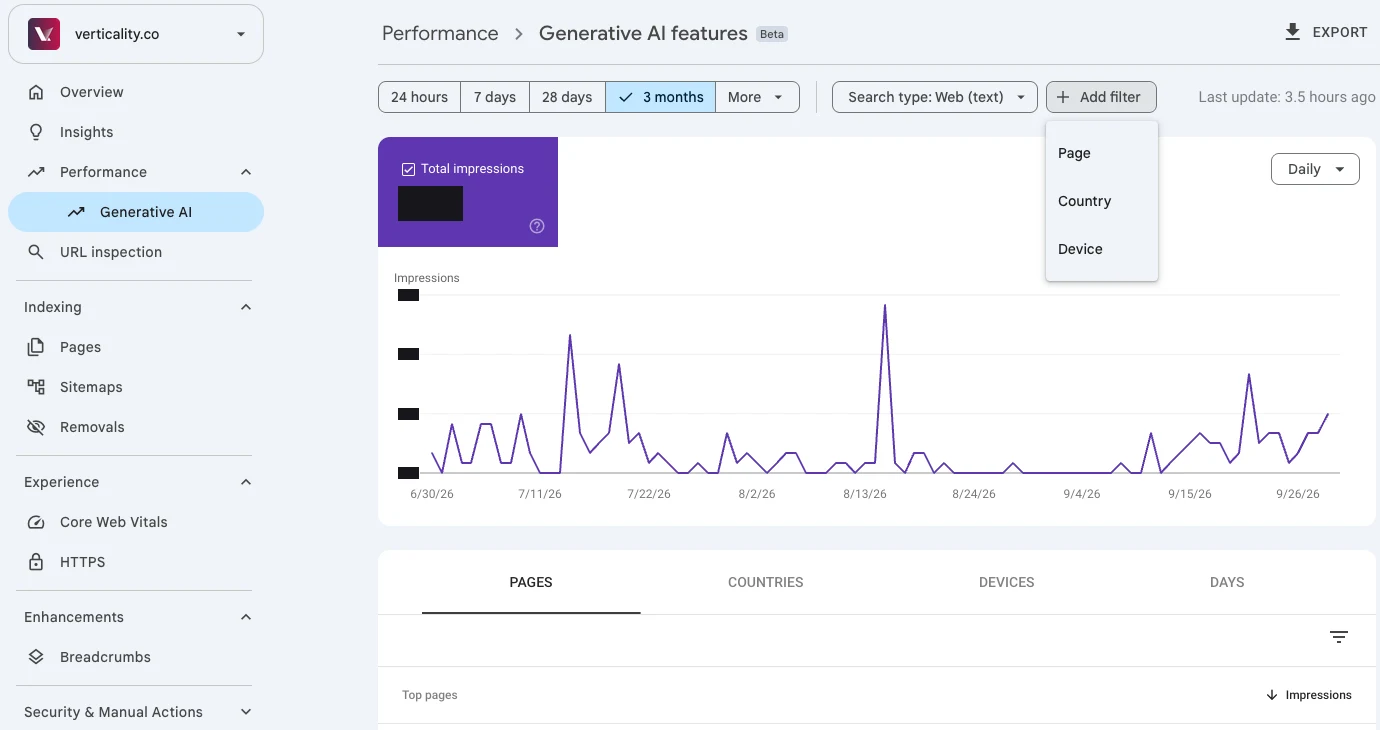
Impressions only: no queries, no clicks and no split between AI Overviews and AI Mode.
Observed: our own property. In verticality.co’s report, the page list showed which of our pages Google surfaces in AI answers, and nothing about the questions behind them. For that we read the answers themselves, every day, in our tracker.
Impressions are not the goal. Google says clicks from results pages with AI Overviews are “higher quality (meaning, users are more likely to spend more time on the site)”. Take the pages the report lists, open them as landing pages in your analytics, and check whether those visits turn into leads or sales.
What should you check first on your own site?
Run this list in order. Each step depends on the one before it.
- Search Console, Settings, Search generative AI: confirm “Include my site’s links and content” is selected.
- URL Inspection on your key pages: indexed, crawl allowed, no
nosnippetor tightmax-snippetwhere you want to be quoted. - Generative AI performance report: list the pages that already get AI impressions and the ones that should and do not.
- Ten buyer questions in Google: note who the AI Overview and AI Mode cite, what kind of page they are, and which sub-questions the answers cover.
- The page that should win each question: one heading per sub-question, the answer first, facts nobody else states, a named author and an honest updated date.
- Re-check the report and the answers every month. Single answers move from day to day; trends do not.
If your concern is traffic that AI Overviews already took, not visibility, that is a different problem with its own playbook.
If you would rather have this done for you, our generative engine optimization program covers Google AI Overviews and AI Mode alongside ChatGPT and Perplexity, month to month. It starts with a free AI visibility audit of the questions your buyers ask.
Frequently asked questions
Do I need llms.txt or special schema to appear in Google AI Overviews?
No. Google's guide to generative AI features in Search, updated 10 July 2026, says Google Search does not use llms.txt or other AI text files and that no special schema.org markup is required. Structured data still helps with rich results, as long as it matches what the page visibly says.
Is optimizing for AI Mode different from optimizing for AI Overviews?
The rules are the same: an indexed, snippet-eligible page on a site that has not opted out in Search Console. The behaviour differs. AI Mode splits a question into subtopics and supports follow-up questions, and Google says the two features may use different models, so one page can be cited in one and missing from the other.
Where do I see AI Overviews and AI Mode data in Google Search Console?
Open Performance, then Generative AI features. Google calls it the Generative AI performance report; it reached every site on 31 August 2026. It reports impressions by page, country, device and date. It has no queries, no clicks and no split between AI Overviews and AI Mode; clicks stay inside the main Performance report.
Does blocking Google-Extended remove my site from AI Overviews?
No. Google-Extended limits AI training and grounding in some of Google's other systems. To keep content out of AI Overviews and AI Mode, Google points to the Search generative AI control in Search Console settings, or to nosnippet, max-snippet and noindex, which also affect regular Search.
Can I keep my site out of AI Overviews but stay in regular Google results?
Yes. In Search Console, Settings, Search generative AI lets a property exclude its links and content from AI Overviews, AI Mode and Discover's AI features. Google says the exclusion usually takes effect within one to two days and that the setting is not used as a ranking signal for the rest of Search.
Want your brand named in AI answers?
Our free AI visibility audit asks ChatGPT, Perplexity and Google AI Overviews the questions your buyers ask, shows who gets named instead of you and which sources they cite, and ends with a ranked work plan.
Get a free AI visibility auditNot ready for a call? Run the free AI visibility checker: 40+ buyer questions in ChatGPT and Google AI Overviews, report by email within 24 hours.